# AI Overviews in Google Search: how they choose sources and how to appear
> AI Overviews and AI Mode link indexed pages that can show a snippet. How Google picks those sources, and the controls that decide whether your pages appear.
- URL: https://computese.com/ai-overviews-in-search/
- Author: Duong Quan Nguyen, CEO, Computese
- Published: 2025-01-22
- Updated: 2026-09-25
- Topics: SEO
## In short
- AI Overviews and AI Mode are part of Google Search: they run related searches (query fan-out), retrieve pages from the Search index with Google's ranking systems, write an answer and link the pages that support it.
- A page is eligible as a supporting link if it is indexed and may show a snippet, and its site is not excluded in Search Console. Google requires no special markup, llms.txt file or AI-specific optimization.
- Per page, nosnippet, data-nosnippet, max-snippet and noindex limit what AI features show. As of August 31, 2026, every site also has a Search Console setting to opt out entirely. Google-Extended governs Gemini training, not Search.
- What gets a page cited is ordinary SEO done well: clear, original answers in crawlable text, headings that organize them, structured data that matches the visible page, and a good page experience.
- Clicks from AI Overviews and AI Mode count in Search Console's Performance report under the Web search type, and every link in one AI Overview shares a single position.
AI Overviews are AI-generated summaries at the top of some Google results; AI Mode is Google's conversational search for longer questions. Both run related searches (query fan-out), retrieve indexed pages with Google's ranking systems, write an answer and link the pages that support it. Any indexed page that may show a snippet is eligible, and no special markup is needed.
This guide covers the AI layer of Google Search the way Google documents it for site owners: how it grew from the 2023 Search Generative Experience into AI Mode, how it chooses the pages it links to, what makes a page likely to be cited, which controls limit what it shows, and how its clicks are counted in Search Console. If you were after an overview of the Google search engine itself (how it crawls, indexes and ranks pages), start with [how the Google search engine works](https://computese.com/how-google-search-engine-works/).
## What AI Overviews and AI Mode are
Both are features of Google Search, not separate products: AI Overviews appear on the results page alongside knowledge panels, local results and the classic links, and AI Mode is a mode inside Search. Google's [documentation for site owners](https://developers.google.com/search/docs/appearance/ai-features), last updated in December 2025, describes them as two different tools for two kinds of question:
- **AI Overviews** summarize the gist of a topic or question on a normal results page, with links to learn more. Google says they appear only when its systems judge them additive to classic Search, and that they often do not trigger. During 2024 Google added a link panel beside the summary on desktop, site icons to tap on mobile and, [in October 2024](https://blog.google/products-and-platforms/products/search/ai-overviews-search-october-2024/), links in-line within the text.
- **AI Mode** is a separate conversational mode, opened from its own tab in Search or the search bar in the Google app. It is meant for questions that need exploration, reasoning or comparisons, and it keeps the context for follow-up questions. Google said at launch that when it lacks [high confidence](https://blog.google/products-and-platforms/products/search/ai-mode-search/) in an AI response, AI Mode shows a set of web results instead.
The two may use different models and techniques, so the same question can produce different answers and different links in each. Since January 2026 they are also connected: a follow-up question asked from an AI Overview [continues in AI Mode](https://blog.google/products-and-platforms/products/search/ai-mode-ai-overviews-updates/) with its context kept.
## From SGE to AI Mode: a short history
Google announced each step on its blog and in Search Central, and the dates matter when you read older advice: a tip written for SGE in 2023 describes a Labs experiment that no longer exists.
| Date | What changed |
| ----------------- | --------------------------------------------------------------------------------------------------------------------------------------------------------------------------------------------------------------------------------------------------------- |
| May 10, 2023 | [SGE (Search Generative Experience)](https://blog.google/products-and-platforms/products/search/generative-ai-search/) is announced as a Search Labs experiment in the U.S., English only, on Chrome desktop and the Google app. |
| May 14, 2024 | [AI Overviews](https://blog.google/products-and-platforms/products/search/generative-ai-google-search-may-2024/) begin rolling out to everyone in the U.S., built on a Gemini model customized for Search. Google's documentation says they replace SGE. |
| August 2024 | AI Overviews expand beyond the U.S. for the first time. |
| October 28, 2024 | AI Overviews begin rolling out in more than 100 countries and territories, which Google said would give them more than 1 billion users a month. |
| March 5, 2025 | Gemini 2.0 comes to AI Overviews in the U.S. for harder questions, and signing in is no longer required. AI Mode starts as an opt-in Labs experiment. |
| May 20, 2025 | [AI Mode](https://blog.google/products-and-platforms/products/search/google-search-ai-mode-update/) rolls out to everyone in the U.S. without a Labs sign-up; a custom Gemini 2.5 comes to both features there. |
| August 21, 2025 | AI Mode, already in the U.S., India and the UK, [expands](https://blog.google/products-and-platforms/products/search/ai-mode-agentic-personalized/) to over 180 more countries and territories in English. |
| September 8, 2025 | AI Mode [adds](https://blog.google/products-and-platforms/products/search/ai-mode-expands-more-languages/) Hindi, Indonesian, Japanese, Korean and Brazilian Portuguese. |
| November 18, 2025 | [Gemini 3](https://blog.google/products-and-platforms/products/search/gemini-3-search-ai-mode/) arrives in Search on its launch day, starting with AI Mode for Pro and Ultra subscribers in the U.S., and query fan-out is upgraded to run more searches. |
| January 27, 2026 | Gemini 3 becomes the default model for AI Overviews globally, and follow-ups flow from an AI Overview into AI Mode. |
| March 26, 2026 | Search Live reaches every language and location where AI Mode is available: [more than 200 countries and territories](https://blog.google/products-and-platforms/products/search/search-live-global-expansion/). |
| May 19, 2026 | Google reports that AI Mode has [passed one billion monthly users](https://blog.google/products-and-platforms/products/search/search-io-2026/); Gemini 3.5 Flash becomes its default model globally. |
| August 31, 2026 | Search Console's generative AI control and [generative AI performance report](https://developers.google.com/search/blog/2026/06/gen-ai-performance-reports) reach all websites worldwide. |
The direction is consistent: AI Overviews grew from a U.S. experiment into a global feature of the results page, and AI Mode became the place for longer conversations, where Google says its newest model capabilities arrive first.
## How AI Overviews and AI Mode choose the pages they link to
Google's [guide to optimizing for generative AI features](https://developers.google.com/search/docs/fundamentals/ai-optimization-guide), published on May 15, 2026, says both features are rooted in its core Search ranking and quality systems, and their sources come from the same Search index as classic results. The process has three parts:
1. **Query fan-out.** The model generates a set of related queries and runs them at the same time, across subtopics and data sources, to gather more than one search would return.
2. **Retrieval-augmented generation (RAG).** Google also calls this grounding. The core ranking systems retrieve relevant, up-to-date pages from the Search index for those queries, the model reviews the specific information in the retrieved pages, and it writes a response.
3. **Supporting links.** The response shows clickable links to the pages that support its information. While it is being generated, the models can identify further supporting pages, which is why Google says AI features can show a wider and more diverse set of links than a classic results page.
Fan-out is the step that changes who gets linked. Take a question such as "how do I move a WordPress site to a new host without downtime". Fanned out, it might become searches about exporting the database, lowering the DNS TTL beforehand and checking the site once DNS has switched. Each of those is answered by the same ranking systems as any other query, so a page that explains one subtopic clearly can be cited even if it would never rank for the long original question.
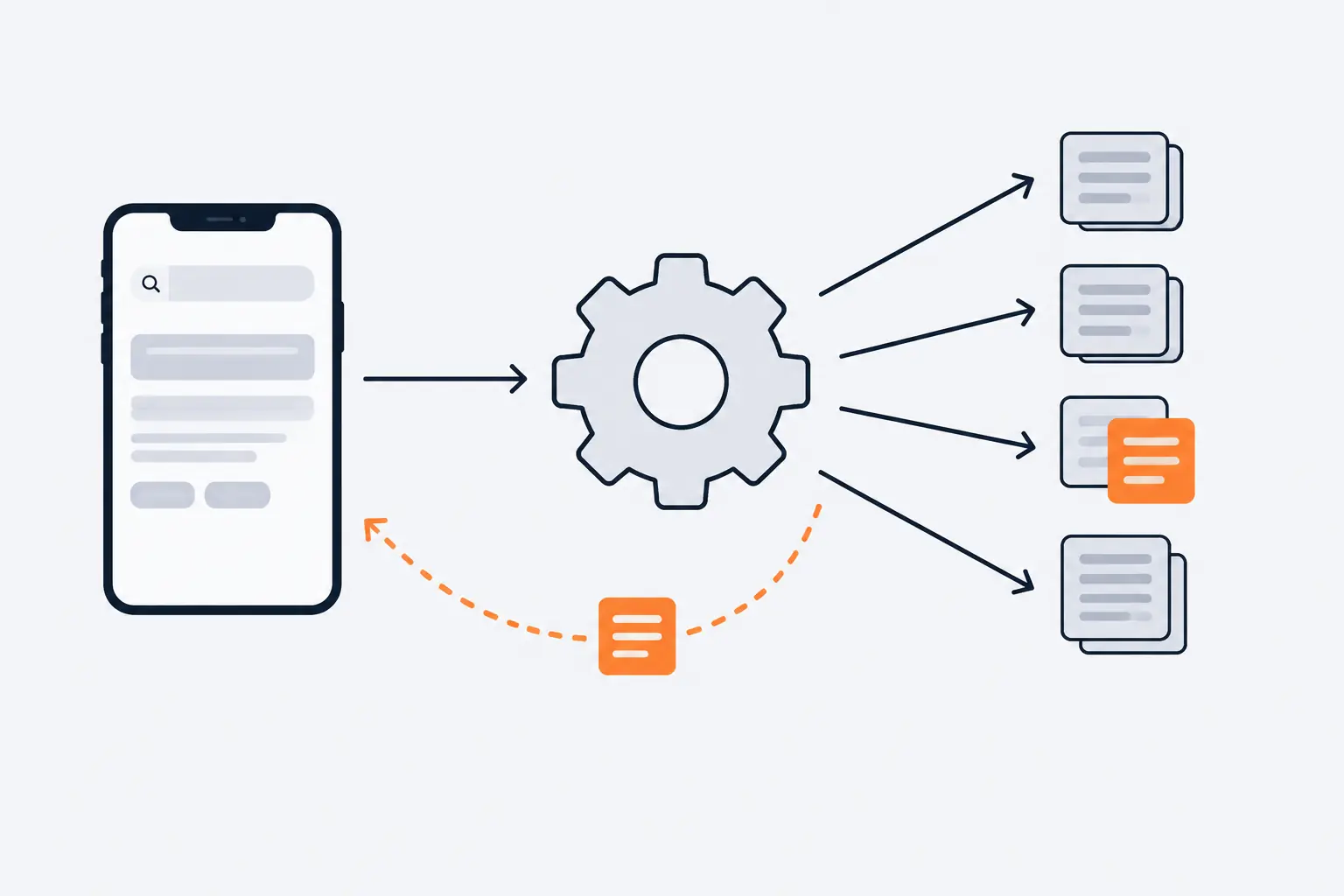
*One question becomes several searches, so a page can be cited for answering one subtopic well, not the whole question.*
The depth of fan-out keeps growing. Google said in May 2025 that Deep Search in AI Mode can issue hundreds of searches for one question, and in November 2025 that Gemini 3 lets fan-out run even more searches and find content it may previously have missed. AI Mode also draws on sources beyond web pages, such as the Knowledge Graph and shopping data for billions of products.
Two limits apply to every source. First, Google's [spam policies](https://developers.google.com/search/docs/essentials/spam-policies) name attempts to manipulate generative AI responses in Google Search as spam, a clarification Google added in May 2026. Second, meeting every requirement makes a page eligible, not guaranteed: Google states that indexing and serving aren't guaranteed. For how pages enter the index in the first place, see [web crawling and indexing explained](https://computese.com/web-crawling-and-indexing-explained/).
## What a page needs to be eligible, and how to check
Google's rule is short: to be shown as a supporting link, a page must be indexed and eligible to appear in Google Search with a snippet, fulfilling the Search [technical requirements](https://developers.google.com/search/docs/essentials/technical). There are no additional technical requirements. In practice, that is six checks:
1. **Googlebot can reach the page.** robots.txt must allow it, and so must your CDN and hosting. Google's checklist names that infrastructure explicitly: a bot-protection rule at the edge can block Googlebot as surely as a `Disallow` line.
2. **The page works.** Google indexes only pages served with HTTP 200; error pages are not indexed.
3. **The content is indexable.** The text is in a file type Google supports and does not violate the spam policies.
4. **The page is indexed.** It has no `noindex` rule, and the URL Inspection tool in Search Console reports it as indexed.
5. **A snippet is allowed.** No `nosnippet` rule, and no `max-snippet:0`, which means the same thing.
6. **The site is included in AI features.** The generative AI optimization guide adds that a site must be included in Search generative AI features in Search Console. Include is the default, so this only fails if someone chose to exclude the site or a parent property.
> [!NOTE]
> Google says you do not need new machine-readable files, AI text files or special schema.org markup to appear in AI Overviews or AI Mode. If a page passes the six checks above, it is in the pool; what follows decides whether it is picked.
## What helps a page get cited
Once a page is eligible, it competes on the same qualities as in classic results. Google's guidance for AI features reframes familiar SEO practice rather than adding to it.
### Answer the question clearly, and add something new
Google says content that people find unique, compelling and useful will likely influence a site's presence in generative AI search more, in the long run, than any other suggestion in its guide. It separates commodity content, built from common knowledge anyone could write, from non-commodity content that brings first-hand experience or an expert view. A summary of what other pages already say gives an AI response nothing it could not get elsewhere.
Structure helps both readers and retrieval. Google recommends organizing pages into paragraphs and sections under clear headings; within each section, put the direct answer first and the detail after it. Covering a topic's related questions in one well-built page is also how you match fan-out queries naturally; [semantic SEO](https://computese.com/semantic-seo/) explains how to map a topic's entities and subtopics.
What does not work is the opposite: publishing a separate page for every variant or fan-out query. Google says doing that mainly to manipulate rankings or AI responses violates its scaled content abuse policy. The same applies to AI-written pages: Google's [guidance on generative AI content](https://developers.google.com/search/docs/fundamentals/using-gen-ai-content) says AI tools can help with research and structure, but generating many pages without adding value for users may violate the same policy. Our guide to [AI-generated content in SEO](https://computese.com/the-rise-of-ai-generated-content-in-seo/) covers where that line sits.
### Put the answer in crawlable text
Google's checklist asks that important content be available in textual form, supported by high-quality images and video where they help, and reachable through internal links. Google can process JavaScript as long as it is not blocked, but says JavaScript sites are generally more complex to get right. If your main text only appears after client-side code runs, check the rendered HTML in the URL Inspection tool. Choosing static or server rendering route by route is part of our [web design and development](https://computese.com/services/web-design-development/) work.
### Keep structured data true to the page
Structured data is not required for AI features, and there is no special markup for them. It is still worth using, because it makes pages eligible for rich results. Google's [structured data guidelines](https://developers.google.com/search/docs/appearance/structured-data/sd-policies) set the rule that matters here: do not mark up content that is not visible to readers, and keep markup complete and representative of the page. Markup that describes something the page does not show can cost the page its rich results.
### Give visitors a good page experience
A cited page still has to satisfy the person who clicks, and Google's [advice for AI search](https://developers.google.com/search/blog/2025/05/succeeding-in-ai-search) asks for a good experience whether visitors arrive from classic or AI results. Its [page experience](https://developers.google.com/search/docs/appearance/page-experience) questions are the practical checklist: good Core Web Vitals, HTTPS, a layout that works on mobile, no excessive ads or intrusive interstitials in the way of the content, and main content that is easy to tell apart from everything else. Google says there is no single page experience signal, but that its ranking systems use Core Web Vitals.
### Keep business and product data current
AI responses can include product listings and local business details, so Google asks businesses to keep Merchant Center feeds and Business Profiles up to date. Publishers have one more lever, available in AI features since May 2026: readers who choose a site as a [preferred source](https://developers.google.com/search/docs/appearance/preferred-sources) can see its content highlighted with a "preferred" badge in AI Overviews and AI Mode. Only domain and subdomain-level sites are eligible, and the site must be included in Search generative AI features.
## What Google says you can ignore
Terms like AEO (answer engine optimization) and GEO (generative engine optimization) come with a lot of advice. From Google Search's side, optimizing for generative AI search is still SEO, and its 2026 guide lists tactics that do nothing for Google:
| Advice you will hear | What Google says |
| ----------------------------------------- | ------------------------------------------------------------------------------------------------------------- |
| Publish an `llms.txt` file | Google Search ignores it. It neither helps nor harms, and is fine to keep for other services that read it. |
| Split content into small "chunks" | Not required. Google's systems understand pages that cover several topics, and there is no ideal page length. |
| Rewrite everything for AI | Not needed. AI systems understand synonyms and general meaning, so you need not cover every keyword variant. |
| Collect mentions across the web | Inauthentic mentions help less than they seem: ranking systems reward quality and other systems block spam. |
| Add AI-specific schema | There is none. Structured data is not required for generative AI search. |
| Buy a tool that reads Google's AI signals | No third-party tool has access to Google's internal ranking or AI systems. |
If you would rather have someone check this properly, our [SEO service](https://computese.com/services/seo/) audits the crawl, render and index layers, and tracks where you are cited in AI answers alongside classic rankings.
## How to limit what AI features show from your site
Google treats AI as built into Search, so its controls for AI features are the controls for Search, plus one site-wide setting that reached every website in August 2026. Choose by what you want to keep:
| Control | Where it is set | Effect on AI Overviews and AI Mode | Effect on classic results |
| -------------------------------------- | ---------------------------------------------- | ---------------------------------------------------------- | ------------------------------------------------ |
| `Disallow` for Googlebot | robots.txt | Content cannot be crawled for Search, AI features included | Content not crawled; the bare URL may still show |
| `noindex` | Robots meta tag or `X-Robots-Tag` header | Page not shown | Page removed from results |
| `nosnippet` | Robots meta tag or `X-Robots-Tag` header | No text shown, and not used as a direct input | No text snippet |
| `max-snippet:[number]` | Robots meta tag or `X-Robots-Tag` header | Limits how much text may be used as a direct input | Limits snippet length |
| `data-nosnippet` | HTML attribute on `span`, `div` or `section` | Marked passages not shown | Marked passages kept out of snippets |
| Search generative AI control (exclude) | Search Console, Settings, Search generative AI | Site's links and content excluded | None; Google says it is not a ranking signal |
| `Google-Extended` | robots.txt | None | None |
The [robots meta tag specification](https://developers.google.com/search/docs/crawling-indexing/robots-meta-tag) spells out the AI effects: `nosnippet` applies to every form of result, AI Overviews and AI Mode included, and stops the content being used as a direct input for them; `max-snippet` limits how much can be used, except where you have granted permission separately, for example through in-page structured data or a licence agreement with Google. In HTML the rules look like this, and for PDFs and other files you send the same values in an `X-Robots-Tag` header:
```html
This paragraph may appear in snippets and AI answers.
Member pricing details stay out of snippets and AI answers.
```
`data-nosnippet` is a boolean attribute: any value you give it is ignored, so `data-nosnippet="false"` still excludes the element. It works only on `span`, `div` and `section`, the HTML must be valid, and an unclosed `div` excludes everything after it. Google may read the attribute before or after rendering, so do not add or remove it on existing elements with JavaScript: put it in the server HTML, or on new elements as they are first inserted.
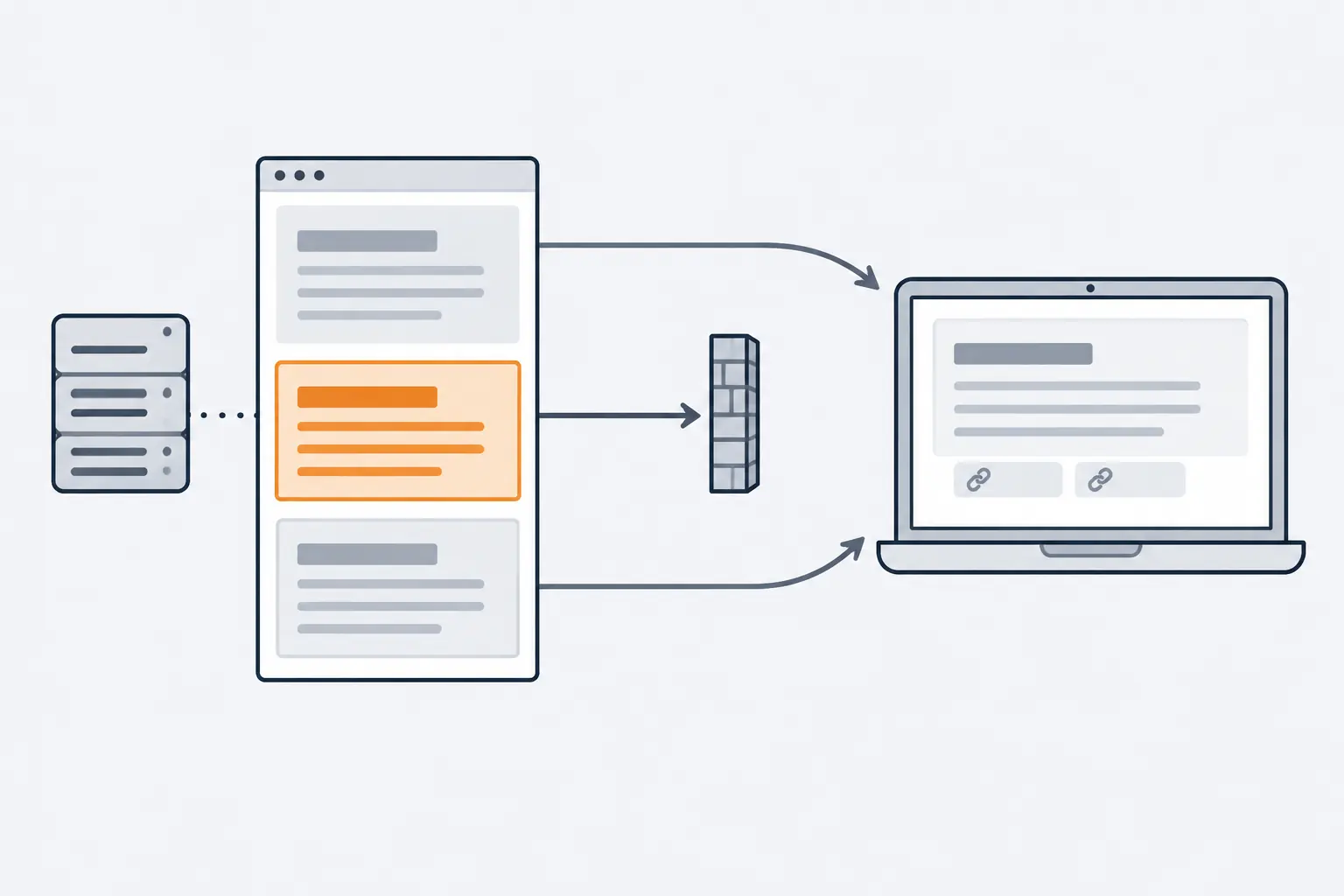
*Preview controls work on text, not links: the page can still be cited while a marked passage stays out of what Search shows.*
Of these, the **Search generative AI control** is the only one that limits AI features without touching classic results. Excluding a site removes its links and content from AI Overviews, AI Mode and generative AI features in Discover; content from other sites still appears and may look similar to yours. [Google's help page](https://support.google.com/webmasters/answer/16908024) adds four details worth knowing before you use it:
- It covers AI features only. Google says the setting is not a ranking or inclusion signal for the rest of Search, though your content may still help Search as a whole, for example in understanding the language of queries and pages.
- It takes effect in days, not instantly: content is excluded within one to two days of the change going live, and some takes longer because of caching.
- Properties inherit it. A child property, such as a subdomain or a URL-prefix path, follows the closest parent property that set the control, unless an owner sets a different value on the child.
- It does not affect AI training. For that, Google points to Google-Extended.
**[Google-Extended](https://developers.google.com/crawling/docs/crawlers-fetchers/google-common-crawlers)** is a robots.txt token with no crawler of its own. It decides whether content Google crawls may be used to train future Gemini models for Gemini Apps and the Vertex AI API, and for grounding in Gemini Apps and Grounding with Google Search on Vertex AI. Google states that it does not affect a site's inclusion in Google Search and is not a ranking signal. Other answer engines, such as ChatGPT search and Perplexity, run their own crawlers with their own robots.txt tokens; the [crawling guide](https://computese.com/web-crawling-and-indexing-explained/) lists them.
> [!WARNING]
> Blocking Googlebot in robots.txt or adding `noindex` to keep content out of AI Overviews also takes it out of classic results. If the goal is AI features only, use the Search Console control for the whole site, or preview controls for specific pages and passages.
If a control seems to be ignored, check that Googlebot actually sees it: the URL Inspection tool shows the HTML Google received. Then allow time. Google notes that recrawling can take from several days to several months, and you can request a recrawl for important URLs.
## How AI feature clicks are counted in Search Console
In the main Performance report, AI features are not a separate line: Google says sites appearing in AI Overviews and AI Mode are included in overall search traffic, reported within the "Web" search type. Its [counting rules](https://support.google.com/webmasters/answer/7042828) define each metric:
- **Click:** clicking a link to an external page in an AI Overview or in AI Mode counts as a click.
- **Impression:** the standard impression rules apply.
- **Position:** an AI Overview occupies a single position in the results, and all links inside it get that same position. In AI Mode, position follows the same method as a normal results page.
- **Follow-ups:** a follow-up question in AI Mode counts as a new query, with its own impressions, positions and clicks.
- **Labs experiments** are not included.
AI Mode data has counted towards the Performance report totals [since June 2025](https://developers.google.com/search/updates). For a view of AI features alone, Google launched the [Generative AI performance report](https://support.google.com/webmasters/answer/16984139) on June 3, 2026, and as of August 31, 2026 it has reached all websites worldwide. It shows impressions (how many times links to your site appeared in AI Overviews and AI Mode) by page, country, device and date, with filters for text and multimodal searches. It reports impressions, not clicks. What AI Overviews do to your click-through rate is a separate question that needs its own method, so treat these numbers as visibility, not traffic.
## Key terms
- **AI Overview**: An AI-generated summary at the top of some Google results pages, with links to the pages that support it. Google shows one only when its systems judge it adds something to the classic results.
- **AI Mode**: Google Search's conversational mode for longer, multi-part questions and follow-ups. It answers with links to supporting pages and, when Google lacks confidence in an AI response, shows web results instead.
- **Search Generative Experience (SGE)**: Google's 2023 Search Labs experiment with AI-generated answers in Search. AI Overviews replaced it in May 2024.
- **Query fan-out**: The technique in which the model issues several related searches at once, across subtopics and data sources, and combines what they return into one response.
- **Retrieval-augmented generation (RAG)**: Generating an answer from documents retrieved at question time instead of from the model's memory alone. Google also calls it grounding; its core ranking systems retrieve the pages from the Search index.
- **Supporting link**: A link to a web page shown with an AI response because that page supports the information in the response.
- **Preview controls**: The nosnippet and max-snippet robots rules and the data-nosnippet attribute. They limit what Google shows from a page in its results, AI Overviews and AI Mode included.
- **Google-Extended**: A robots.txt product token with no crawler of its own. It decides whether content Google crawls may train Gemini models and ground Gemini Apps and Vertex AI. It has no effect on Google Search.
- **Search generative AI control**: A Search Console setting that includes or excludes a site's links and content from AI Overviews, AI Mode and generative AI features in Discover. Include is the default.
## Common questions
### What are AI Overviews in Google Search?
AI Overviews are AI-generated summaries at the top of some Google results pages, with links to the pages that support them. They began rolling out in the U.S. on May 14, 2024, replacing the Search Generative Experience experiment, and Google shows them only when it judges they add something to the classic results.
### How do I get my website to appear in AI Overviews?
Meet the requirements for any result with a snippet: Googlebot can crawl the page, it returns HTTP 200, it is indexed and no nosnippet rule blocks it. Then answer questions clearly in crawlable text. Google says no special markup or AI-specific optimization is needed, and appearing is never guaranteed.
### Can I opt out of AI Overviews without leaving Google Search?
Yes. The Search generative AI control in Search Console excludes a site from AI Overviews, AI Mode and generative AI features in Discover, and Google says it is not used as a ranking signal for the rest of Search. For single pages or passages, nosnippet, max-snippet and data-nosnippet work too, but they also limit classic snippets.
### Does blocking Google-Extended remove my site from AI Overviews?
No. Google-Extended controls whether your content may train Gemini models and ground Gemini Apps and Vertex AI. Google states that it does not affect inclusion or ranking in Google Search, and AI Overviews and AI Mode are part of Search.
### Do I need schema markup or an llms.txt file for AI Overviews?
No. Google says there is no special schema.org markup for its AI features, and that Google Search ignores llms.txt and similar files. Structured data is still worth using for rich results, as long as it matches what the page visibly shows.
### What is the difference between AI Overviews and AI Mode?
An AI Overview is a summary on a normal results page, shown when Google judges it useful. AI Mode is a separate conversational mode for complex questions and follow-ups. Both use query fan-out, but they may use different models and techniques, so they can link different pages for the same question.
## Sources
1. [AI features and your website](https://developers.google.com/search/docs/appearance/ai-features), Google Search Central
2. [Optimizing your website for generative AI features on Google Search](https://developers.google.com/search/docs/fundamentals/ai-optimization-guide), Google Search Central
3. [Supercharging Search with generative AI](https://blog.google/products-and-platforms/products/search/generative-ai-search/), Google
4. [Generative AI in Search: Let Google do the searching for you](https://blog.google/products-and-platforms/products/search/generative-ai-google-search-may-2024/), Google
5. [Latest Google Search documentation updates](https://developers.google.com/search/updates), Google Search Central
6. [AI Overviews in Search are coming to more places around the world](https://blog.google/products-and-platforms/products/search/ai-overviews-search-october-2024/), Google
7. [Expanding AI Overviews and introducing AI Mode](https://blog.google/products-and-platforms/products/search/ai-mode-search/), Google
8. [AI in Search: Going beyond information to intelligence](https://blog.google/products-and-platforms/products/search/google-search-ai-mode-update/), Google
9. [AI Mode in Search gets new agentic features and expands globally](https://blog.google/products-and-platforms/products/search/ai-mode-agentic-personalized/), Google
10. [AI Mode in Google Search expands to more languages](https://blog.google/products-and-platforms/products/search/ai-mode-expands-more-languages/), Google
11. [Google Search with Gemini 3: Our most intelligent search yet](https://blog.google/products-and-platforms/products/search/gemini-3-search-ai-mode/), Google
12. [Just ask anything: a seamless new Search experience](https://blog.google/products-and-platforms/products/search/ai-mode-ai-overviews-updates/), Google
13. [Search Live is expanding globally](https://blog.google/products-and-platforms/products/search/search-live-global-expansion/), Google
14. [A new era for AI Search](https://blog.google/products-and-platforms/products/search/search-io-2026/), Google
15. [Google Search technical requirements](https://developers.google.com/search/docs/essentials/technical), Google Search Central
16. [Spam policies for Google web search](https://developers.google.com/search/docs/essentials/spam-policies), Google Search Central
17. [Google Search's guidance on using generative AI content on your website](https://developers.google.com/search/docs/fundamentals/using-gen-ai-content), Google Search Central
18. [General structured data guidelines](https://developers.google.com/search/docs/appearance/structured-data/sd-policies), Google Search Central
19. [Understanding page experience in Google Search results](https://developers.google.com/search/docs/appearance/page-experience), Google Search Central
20. [Top ways to ensure your content performs well in Google's AI experiences on Search](https://developers.google.com/search/blog/2025/05/succeeding-in-ai-search), Google Search Central Blog
21. [Help your readers find your site through preferred sources in Google Search](https://developers.google.com/search/docs/appearance/preferred-sources), Google Search Central
22. [Robots meta tag, data-nosnippet, and X-Robots-Tag specifications](https://developers.google.com/search/docs/crawling-indexing/robots-meta-tag), Google Search Central
23. [Search generative AI control](https://support.google.com/webmasters/answer/16908024), Google Search Console Help
24. [List of Google's common crawlers](https://developers.google.com/crawling/docs/crawlers-fetchers/google-common-crawlers), Google for Developers
25. [What are impressions, position, and clicks?](https://support.google.com/webmasters/answer/7042828), Google Search Console Help
26. [Generative AI performance report (Search)](https://support.google.com/webmasters/answer/16984139), Google Search Console Help
27. [Introducing Search Generative AI performance reports in Search Console](https://developers.google.com/search/blog/2026/06/gen-ai-performance-reports), Google Search Central Blog