# Quality backlinks in SEO: what makes a link valuable, and what is spam
> A quality backlink is an editorial link from a relevant site people trust. What Google counts, what its link spam policy bans, and when to disavow.
- URL: https://computese.com/the-power-of-quality-backlinks-in-seo/
- Author: Duong Quan Nguyen, CEO, Computese
- Published: 2024-12-02
- Updated: 2026-09-25
- Topics: SEO
## In short
- A quality backlink is an editorial citation: a link the linking site's editor chose, in the text of a relevant page, on a site with real readers, with no payment, swap or software behind it.
- Google uses links to find pages and as one ranking signal among many. Links from prominent sites are generally a sign of trust; links made mainly to manipulate rankings are link spam under its spam policies.
- Since the December 2022 link spam update, SpamBrain detects sites that buy links and sites that exist to pass them. Credit from neutralized links is lost for good, so bought links can be wasted money even when no penalty follows.
- Use the disavow tool only when many spammy links point to your site and they have caused, or likely will cause, a manual action. Otherwise Google generally ignores spam links on its own.
- Power backlinks, Domain Authority, Domain Rating and Authority Score are industry labels and vendor metrics, not Google measures. Judge a link by why it exists, who gave it and whether people click it.
A quality backlink is a link another site gave you because its editor judged your page worth citing: it sits in the text of a relevant page, on a site with real readers and a trusted reputation, and nobody paid, traded or automated it. Links built mainly to move rankings are link spam, which Google neutralizes or penalizes.
This guide explains what Google says links do, the signs that separate a valuable link from a spammy one, what Google's link spam policy forbids, how SpamBrain and manual actions deal with the rest, and when the disavow tool is worth using. Link-based scores such as Domain Authority are a separate subject, covered in [how Google determines a website's authority](https://computese.com/how-google-determines-a-website-authority/).
## What Google says backlinks do
Backlinks do two jobs in Google Search. The first is discovery. Google's [SEO Starter Guide](https://developers.google.com/search/docs/fundamentals/seo-starter-guide) says it primarily finds pages through links from pages it has already crawled, often on other websites, and that the vast majority of new pages it finds every day are found this way. The second is understanding. Google's [link best practices](https://developers.google.com/search/docs/crawling-indexing/links-crawlable) describe links as a signal it uses to judge how relevant pages are. The anchor text, the visible words of the link, tells people and Google something about the page it points to, and the words just before and after the link matter too. The crawl itself is covered in [web crawling and indexing explained](https://computese.com/web-crawling-and-indexing-explained/).
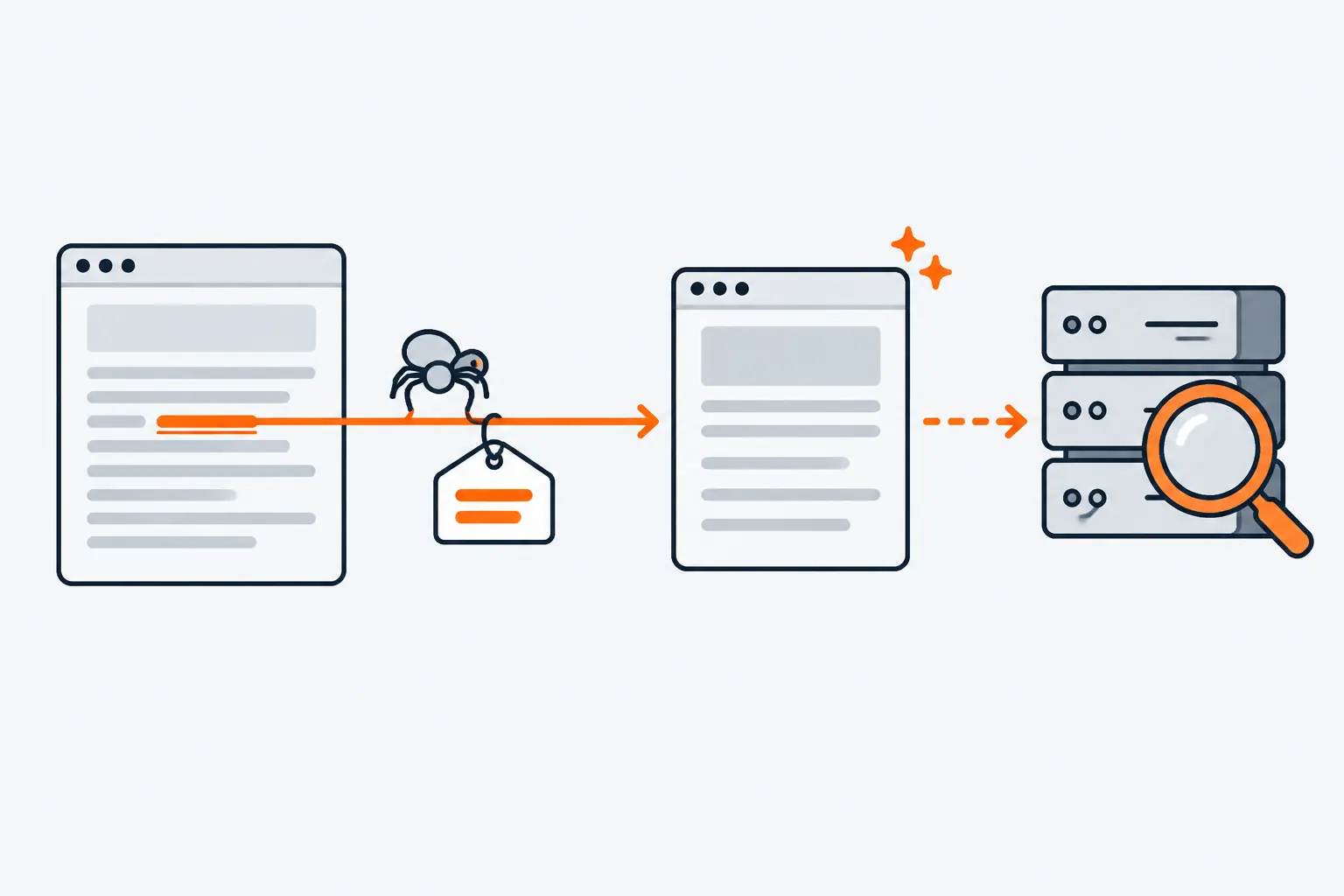
*One link does two jobs: it leads the crawler to the page, and its words tell Google what the page is about.*
Links also feed ranking. Google's [guide to its ranking systems](https://developers.google.com/search/docs/appearance/ranking-systems-guide) says it has several systems that look at how pages link to each other, to work out what pages are about and which might be most helpful for a query. PageRank, the link analysis algorithm Google launched with, is still part of its core ranking systems, although Google says how it works has evolved a lot. The Starter Guide keeps it in proportion: PageRank is one of many ranking signals, and there is much more to Search than links.
Why some links count for more is explained on Google's page about [how Search ranks results](https://www.google.com/search/howsearchworks/how-search-works/ranking-results/). One of the factors it uses to judge quality is whether other prominent websites link to or refer to the content, which Google describes as generally a good sign that the information is trustworthy. Google's [webspam report for 2021](https://developers.google.com/search/blog/2022/04/webspam-report-2021) was more direct: "Links still help us discover and rank results in meaningful ways." That is also why links attract manipulation. Google's own account of [detecting spam](https://www.google.com/search/howsearchworks/how-search-works/detecting-spam/) recalls that once its founders published their PageRank research, spammers tried to game Google by paying each other for links.
## What makes a backlink high quality
Google has not published a checklist for a good backlink, but its documentation describes one from both sides: what it treats as a sign of trust, and what it lists as spam. Read together, a quality backlink has six properties.
1. **It is editorial.** Someone at the linking site chose to add it because it helps their readers. Google's objection to widget links, set out in a [2016 reminder](https://developers.google.com/search/blog/2016/09/a-reminder-about-widget-links), is precisely that they are links the site owner did not editorially place, with anchor text the owner does not control.
2. **It comes from a site people trust.** Google names links and references from prominent websites as a quality signal. For a business, that might be a trade publication, a professional association, a university department or a respected writer in your field.
3. **It is relevant.** The linking page covers a subject related to yours, so the link makes sense where it stands. Links help Google judge relevance, and a link from a page about something unrelated gives its readers no reason to follow it.
4. **It sits in the content.** The link is in the body of the page, next to words that describe your page, rather than in a footer, a template, a widget or a forum signature, which are the placements Google's spam policy lists.
5. **It sends real visitors.** This is not a signal Google has published, but it is the most practical test there is: a link people actually click shows up in your analytics. Google Analytics 4 counts visits that arrive through non-ad links on other sites in its [Referral channel](https://support.google.com/analytics/answer/9756891). A link nobody would ever click was rarely placed for readers.
6. **It is labelled honestly.** If the link was paid for or posted by a user, it carries `rel="sponsored"` or `rel="ugc"`. That does not make it spam. It makes it a link that does not pretend to be an endorsement.
### Quality link or link spam: how to tell them apart
| Question | Quality backlink | Likely link spam |
| ------------------------- | -------------------------------------------------- | ----------------------------------------------------- |
| Why does it exist? | An editor cited your page | Money, goods, a swap or a contract clause produced it |
| Who placed it? | A person at the linking site | Software, or a template copied across many sites |
| Where does it sit? | In the body text, next to related words | Footer, template, widget, comment or forum signature |
| What does the anchor say? | Your name, the page title or a plain description | The same keyword phrase, repeated across many sites |
| What kind of site is it? | One with readers, publishing on its subject | One that exists to pass links to other sites |
| Do you recognize it? | Yes, or it is easy to see why it cites you | No, and it arrived in a batch of recent links |
| Is it tagged? | None needed; sponsored or ugc if paid or user-made | Paid, but passing ranking credit |
## What Google's link spam policy forbids
Google's [spam policies](https://developers.google.com/search/docs/essentials/spam-policies) define link spam as creating links to or from a site primarily to manipulate search rankings. As of September 2026, the policy gives these examples:
- Buying or selling links for ranking purposes: paying money for links or for posts that contain links, exchanging goods or services for links, or sending someone a product in exchange for a write-up that includes a link.
- Excessive link exchanges ("Link to me and I'll link to you"), or partner pages that exist only to cross-link.
- Using automated programs or services to create links to your site.
- Requiring a link in terms of service, a contract or a similar arrangement without letting the other site's owner qualify it.
- Text ads or text links that do not block ranking credit.
- Advertorials or native advertising that carry links passing ranking credit, and links with optimized anchor text in articles, guest posts or press releases distributed on other sites.
- Links from low-quality directories or bookmark sites.
- Keyword-rich, hidden or low-quality links embedded in widgets that are distributed across many sites.
- Links spread widely through the footers or templates of many sites.
- Forum comments with optimized links in the post or the signature.
- Low-value content created mainly to manipulate linking and ranking signals.
The policy also says what is allowed. Buying and selling links is a normal part of advertising and sponsorship on the web, and it does not break Google's rules as long as the link is qualified with `rel="nofollow"` or `rel="sponsored"`. The line is not money; it is whether a paid link passes ranking credit. The same page defines spam as including attempts to manipulate generative AI responses in Google Search, not only rankings, and warns that sites breaking the policies may rank lower or not appear in results at all.
### Guest posts, advertorials and press releases
Guest posts are not banned. In a [2017 reminder about large-scale article campaigns](https://developers.google.com/search/blog/2017/05/a-reminder-about-links-in-large-scale), Google said it does not discourage articles that inform users, educate another site's audience or bring awareness to a cause or company. The violation is an article whose main purpose is to build links back to the author's site at scale. The warning signs Google listed, when taken to an extreme:
- keyword-rich links stuffed into the articles;
- the articles published across many different sites, or a large number of them on a few large sites;
- writers who are not knowledgeable about the topics they write about;
- the same or similar content across the articles, or copies of articles from the author's own site.
Google repeated the point in its [July 2021 post on qualifying links](https://developers.google.com/search/blog/2021/07/link-tagging-and-link-spam-update): sites that publish or acquire links through excessive sponsored and guest posting without the proper link attributes can face algorithmic and manual actions. It also asked sites in affiliate programs to mark affiliate links `rel="sponsored"`. Press releases follow the same rule. A release carrying keyword-rich links, distributed on other sites, is one of the policy's own examples. A release that leads a journalist to write their own story and cite you in it produces an editorial link.
### Widgets, footers and "website by" credits
Widgets are the clearest case of links nobody chose. Google's 2016 reminder explained that some widgets add links the site owner did not editorially place, with anchor text the owner does not control, and that this is why such links break its guidelines. The fix it gave: add `rel="nofollow"` to the widget's links, or remove them.
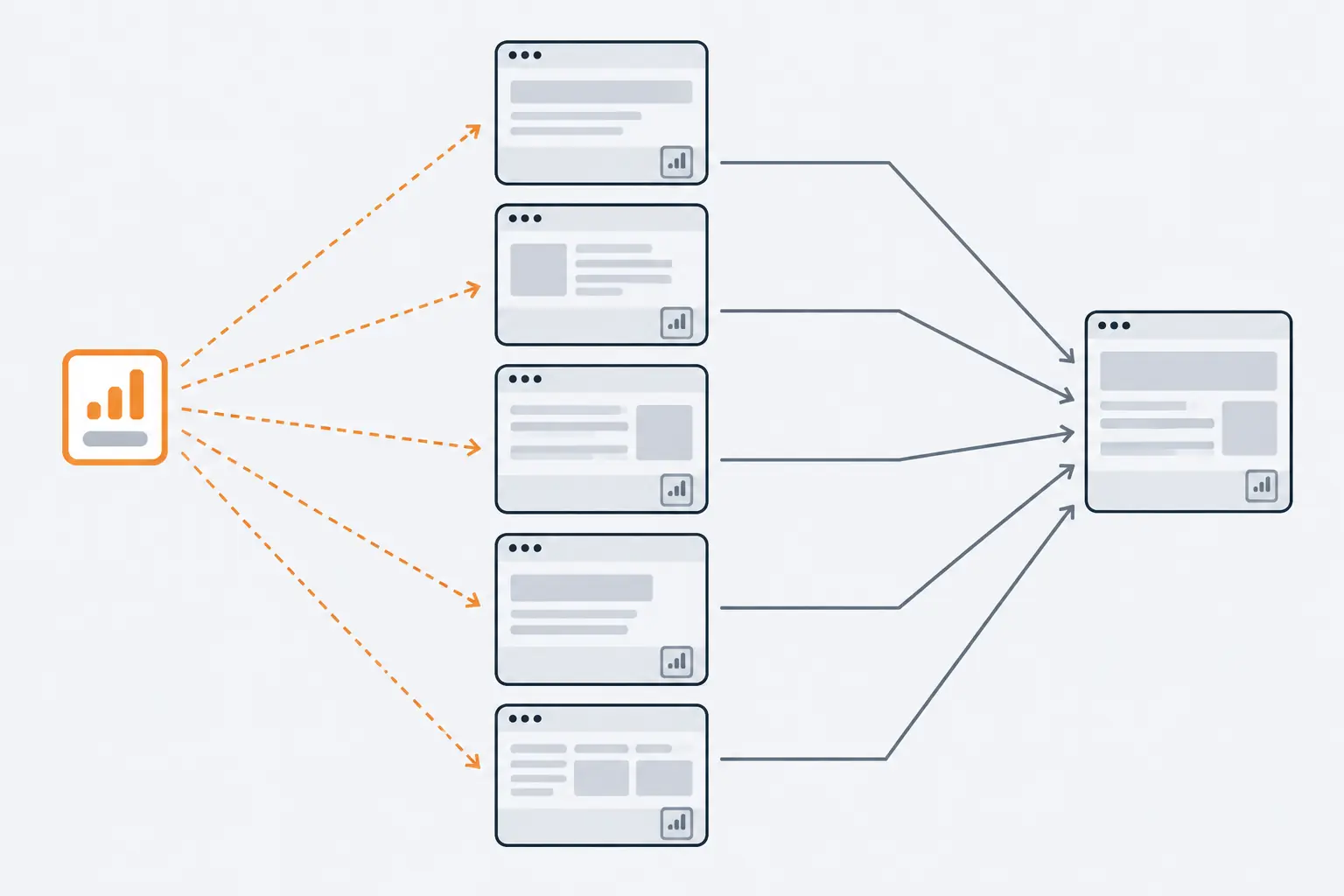
*A link copied into many sites' footers was placed by a template, not chosen by an editor, which is why Google lists it as link spam.*
The same logic covers links in footers and templates spread across many sites. A web agency's "website by" credit on every client site is the familiar example, and so is a theme or plugin that inserts a link on every site that installs it, or a contract that obliges a client to link back. Marking such a credit `rel="nofollow"` keeps it for readers and takes it out of the ranking question. Left as a normal link and placed for ranking credit, it is the pattern the policy describes.
## Where sponsored, ugc and nofollow fit
Link attributes are how a site tells Google what kind of link it is publishing. The full definitions belong in their own explainer, but three facts matter for link quality.
1. **A normal link needs no attribute.** Google's guide to [qualifying outbound links](https://developers.google.com/search/docs/crawling-indexing/qualify-outbound-links) says links you expect Google to follow without qualification need no `rel` value at all. There is no "dofollow" attribute.
2. **Paid and user-made links should say so.** Use `sponsored` for advertisements and paid placements (`nofollow` is still acceptable, but `sponsored` is preferred), `ugc` for comments and forum posts, and `nofollow` when neither applies and you would rather Google not associate your site with the linked page.
3. **They are hints.** When Google [introduced sponsored and ugc on September 10, 2019](https://developers.google.com/search/blog/2019/09/evolving-nofollow-new-ways-to-identify), it made all three values hints about which links to consider or exclude, and `nofollow` became a hint for crawling and indexing on March 1, 2020. Google said that in most cases it would keep treating ugc and nofollow links as before and not consider them for ranking, and that the only real mistake is leaving a clearly paid link unmarked.
An editorial link, a paid placement and a link in a user's comment look like this:
```html
the migration guide
the product page
a commenter's site
```
From the receiving side, that is why the attribute is part of a link's quality: a sponsored link can still bring customers, but it is an advertisement, not a vote.
## How SpamBrain and link spam updates neutralize bad links
Most spam never reaches a person. Google's How Search Works page on spam says its automated systems detect the vast majority of spam and a manual review team handles the rest; as of September 2026, the same page says its systems find 40 billion spammy pages every day. At the centre of that work is SpamBrain, Google's AI-based spam-prevention system, which Google launched in 2018 and lists among its spam detection systems in the ranking systems guide. An earlier system built against link spam, Penguin, was announced in 2012 and made part of Google's core ranking systems in 2016.
Google has run two updates aimed specifically at links. Dates come from the Search Central blog and the [Search Status Dashboard](https://status.search.google.com/products/rGHU1u87FJnkP6W2GwMi/history), which records how long each rollout took:
| Date | Update | What Google said |
| ------------------ | ------------------------------ | ----------------------------------------------------------------------------------- |
| July 26, 2021 | Link spam update | Two-week rollout to nullify link spam more broadly, in many languages |
| December 14, 2022 | December 2022 link spam update | SpamBrain detects sites buying links and sites that pass them; rollout took 29 days |
| April 11, 2023 | Webspam report for 2022 | 50 times more link spam sites detected than in the previous link spam update |
| Since October 2023 | General spam updates | None named for links; the latest began on September 24, 2026 |
The [December 2022 announcement](https://developers.google.com/search/blog/2022/12/december-22-link-spam-update) is the one that matters most to anyone who has bought links. Google said rankings may change as spammy links are neutralized and any credit they passed is lost. Its [page on spam updates](https://developers.google.com/search/docs/appearance/spam-updates) adds the part people miss: after a link spam update, cleaning up may not bring rankings back, because the ranking benefit those links generated cannot be regained. The [2022 webspam report](https://developers.google.com/search/blog/2023/04/webspam-report-2022) described what SpamBrain was trained on: sites building spammy links, and sites created to pass spammy links to others. The second is a fair description of a private blog network: a set of sites run by one owner to pass links to the sites it wants to rank.
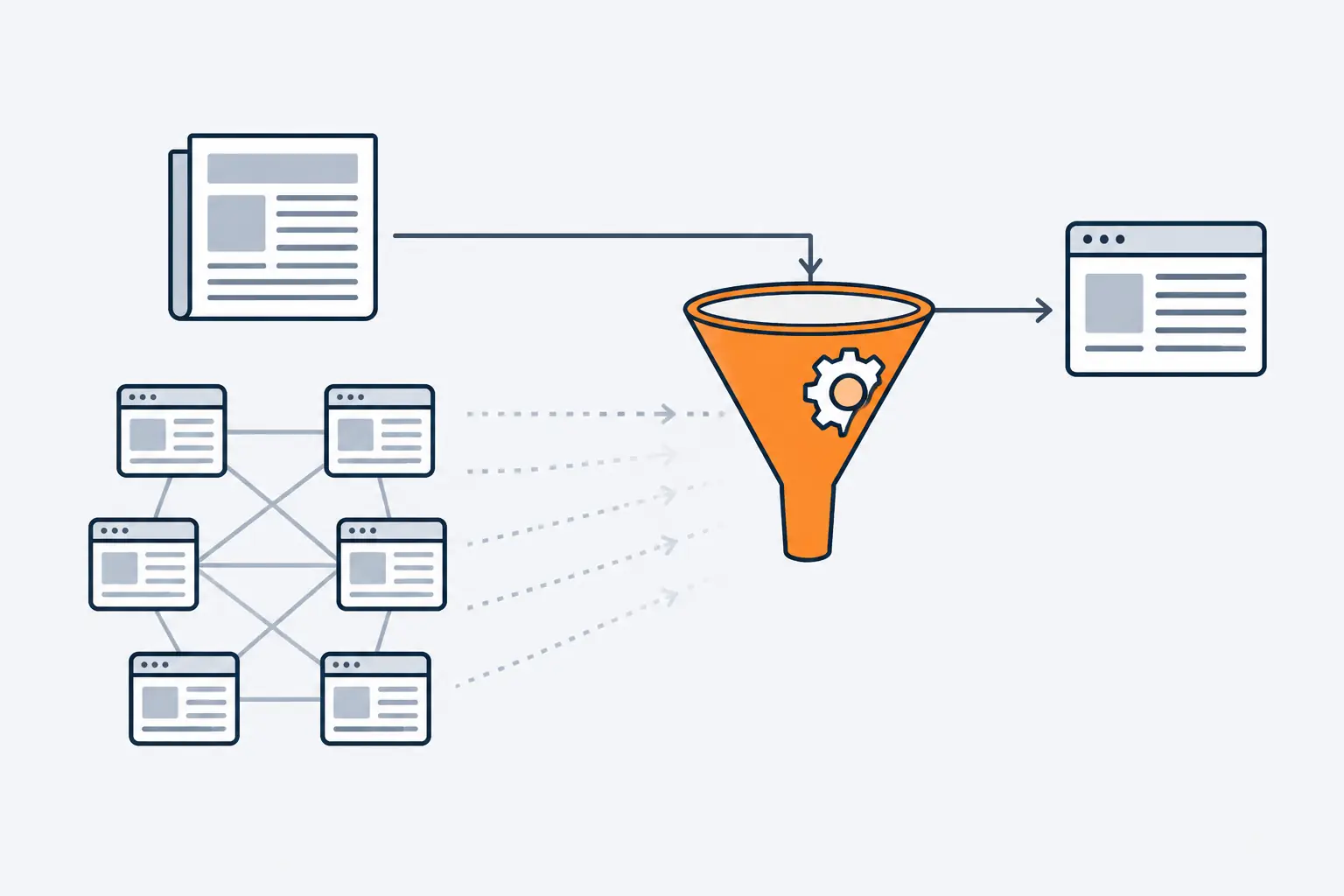
*Neutralized links often bring no penalty at all. They simply stop counting, and the credit they carried is gone.*
So a bought link does not have to be punished to be wasted. As Google put it in 2021, sites taking part in link spam see changes in Search as those links are re-assessed, and any later improvement to SpamBrain can be the one that catches them.
## Manual actions for unnatural links
When people rather than algorithms deal with a pattern of link spam, the result is a manual action: a human reviewer at Google has found that pages on the site break its spam policies, and some or all of the site ranks lower or is left out of results. The [Manual actions report](https://support.google.com/webmasters/answer/9044175) in Search Console shows it, and Google also sends you a message in Search Console. Two manual actions concern links:
- **Unnatural links to your site:** a pattern of unnatural, artificial, deceptive or manipulative links pointing to your site, such as bought links or link schemes.
- **Unnatural links from your site:** the same pattern in your outbound links, such as links you sold or excessive link exchanges.
For links to your site, Google's recommended steps are:
1. Read the link spam policy, so you know what you are looking for.
2. Export your links from Search Console, either by site (Top linking sites, then Export) or by date (Links report, then Export external links, then Latest links).
3. Check the list for links that break the policy. With a long list, start with the sites that link to you most and with links created in the last few months.
4. Ask each site's owner to remove the link or stop it from passing PageRank, for example with `rel="nofollow"` or a more specific attribute.
5. Disavow the links you could not get removed, using the `domain:` operator for many links from one site, and never disavowing organic links.
6. Select **Request Review** in the Manual actions report, with documentation of the links you had removed and an explanation of the ones you could not.
Google is explicit that disavowing every backlink without trying to remove any is not a good-faith effort and can get the request rejected. For links from your site, the fix is to remove the paid or exchanged links, or stop them passing PageRank with `nofollow`, a more specific attribute or a redirect through a page blocked by robots.txt, and then request review. If you bought a site that broke the policies before you owned it, fix the issues and say so in the request.
## When to use the disavow tool
The disavow tool asks Google not to take links from the pages or domains you list into account. Google's [disavow documentation](https://support.google.com/webmasters/answer/2648487) is blunt about who needs it: in most cases Google can assess which links to trust on its own, so most sites never do. Disavow only when both of these are true:
- a considerable number of spammy, artificial or low-quality links point to your site, and
- those links have caused a manual action, or likely will.
Google calls it an advanced feature and warns that using it incorrectly can harm your site's performance in Search. Try to get bad links removed first. When you do disavow, the file is a plain text list:
```text
# Paid article links; removal requested twice, no reply
https://spam.example.com/stuff/paid-links.html
domain:link-network.example
```
The rules, as of September 2026:
- One URL or domain per line, with `domain:` in front of a domain or subdomain. You cannot disavow a subpath such as `example.com/en/`.
- A `.txt` file in UTF-8 or 7-bit ASCII, at most 100,000 lines and 2 MB, with URLs up to 2,048 characters. Lines that start with `#` are comments.
- One list per property. Uploading a new list replaces the old one, and only a property owner can upload.
- The tool does not support Domain properties, so it works on URL-prefix properties, and separate `http` and `https` properties each need a list.
- It can take a few weeks to take effect, and disavowed links still appear in the Links report.
What about spammy links you never asked for? Google says it works hard to make sure actions on third-party sites do not harm a website, and its [Links report help](https://support.google.com/webmasters/answer/9049606) says Google typically ignores links from known spam sites. With no manual action and no history of buying links, the right move is usually to do nothing.
> [!WARNING]
> Google's documentation does not describe links as "toxic"; it talks about spammy, artificial or low-quality links. Do not upload a list of "toxic" links exported from an SEO tool without reading it line by line: Google says not to disavow organic links, and warns that using the tool incorrectly can harm your site's performance.
## Power backlinks, DA and DR: what third-party scores miss
"Power backlinks" is not a term from Google's documentation. It usually means links from strong, well-known sites, often judged by a third-party score: Moz's Domain Authority (DA), Ahrefs' Domain Rating (DR) or Semrush's Authority Score. Those are vendor metrics, each computed from the vendor's own link index. [Moz says](https://moz.com/learn/seo/domain-authority) Domain Authority is not a Google ranking factor and has no effect on search results, and none of the three is a Google metric. [How Google determines a website's authority](https://computese.com/how-google-determines-a-website-authority/) explains what each score measures and how to use it.
A score describes a site. Link quality is about one link. A site with a high score can still sell you a link, and Google's policy is about the sale, not the seller's score. A modest site can give you a link that is editorial, relevant and clicked by exactly the customers you want. Use scores to sort a long list, then judge each link that matters with the questions above.
## How to audit your backlinks
A backlink audit answers two questions: which links are doing real work, and whether any of them put you at risk. Search Console and your analytics cover most of it.
1. **Open the Links report** in Search Console and read the external links tables: top linked pages, top linking sites and top linking text. Keep its limits in mind: it shows a sample rather than every link, its tables stop at 1,000 rows, it can include links that have since been removed, and it does not say whether a link is nofollow.
2. **Check that you recognize the top linking sites.** Google suggests exactly this, and for unknown, possibly spammy sites, asking to be removed before anything else.
3. **Read the top linking text.** Google's advice is to confirm it is what you expect and not spammy. Expect your name, your page titles and plain descriptions. The same keyword phrase arriving from many unrelated sites points to links someone placed rather than earned.
4. **Check the Manual actions report.** A green check mark means there is no manual action against the site.
5. **Look at referral traffic.** In Google Analytics 4, the [Traffic acquisition report](https://support.google.com/analytics/answer/12923437) breaks sessions down by source and medium, so you can see which linking sites send people who read, buy or get in touch.
6. **List every paid relationship:** sponsorships, affiliate programs, paid directory listings and partner pages. Confirm that the links involved are qualified, both on your site and on theirs.
7. **Decide.** Links you did not build, and no manual action: leave them. Links you or a previous agency paid for: get them removed or qualified, and disavow the rest if a manual action exists or is likely.
## How to earn links worth having
Outreach tactics are a subject of their own, covered step by step in [how to do link building for SEO](https://computese.com/how-to-do-link-building-for-seo/), but the principle underneath them is simple. Google's advice in its 2017 reminder was to focus on improving your site's content, and everything, links included, will follow. The Starter Guide adds that other sites linking to you happens naturally over time, that promotion through social media, community engagement, advertising and word of mouth helps people discover your content, and that overdoing promotion can look to search engines like manipulation.
The pages that earn editorial links tend to have the qualities listed in Google's [helpful content self-assessment](https://developers.google.com/search/docs/fundamentals/creating-helpful-content): original information, reporting, research or analysis; the kind of page someone would bookmark, share or recommend; the kind of source a printed magazine, encyclopedia or book would reference. Original data, reference pages, free tools and clear explanations of hard subjects all fit that description.
Our [SEO service](https://computese.com/services/seo/) works this way: it earns links with content worth citing and digital PR where it fits, and it does not buy links or use networks that break search engine guidelines. If you serve a local area, [local SEO](https://computese.com/local-seo/) covers the links and mentions that matter there.
## Key terms
- **Backlink**: A link on a page of another site that points to a page on your site. Search Console's Links report shows a sample of them.
- **Editorial link**: A link that someone at the linking site chose to add because it helps their readers, with no payment, exchange or contract clause behind it.
- **Link spam**: Links created to or from a site primarily to manipulate search rankings, as defined in Google's spam policies. Buying links that pass ranking credit is the classic case.
- **Anchor text**: The visible, clickable words of a link. Google reads it, with the words around it, to understand the page the link points to.
- **rel="sponsored", "ugc" and "nofollow"**: Link attributes that tell Google a link is paid, posted by a user, or not vouched for. Google treats all three as hints, and a paid link must carry sponsored or nofollow.
- **SpamBrain**: Google's AI-based spam-prevention system, launched in 2018. Since December 2022 it also detects sites that buy links and sites used to pass outgoing links.
- **Manual action**: A penalty applied after a human reviewer at Google finds that pages on a site break its spam policies. Unnatural links to a site and from a site are two of the listed types.
- **Disavow**: A Search Console tool that asks Google not to take links from listed pages or domains into account. Google says most sites never need it.
- **Referral traffic**: Visits that arrive through a non-ad link on another site or app. Google Analytics 4 reports them in its Referral channel.
## Common questions
### What makes a good backlink?
One that someone at another site chose to add because your page helps their readers. It sits in the body text of a relevant page, on a site with an audience of its own, uses anchor text that describes your page, and nobody paid for it, swapped it or generated it with software.
### What are power backlinks?
It is an SEO-industry phrase, not a Google term, usually meaning links from strong, well-known sites, often judged by a third-party score such as Domain Authority. Google does not use those scores. A link counts because it is a genuine reference; a link bought because the site scores high is still link spam.
### Can bad backlinks hurt my site?
Usually not, if you did not build them. Google says it works hard to stop actions on third-party sites from harming a website, and that it typically ignores links from known spam sites. Links that you, or an SEO you hired, bought or placed through a scheme are different: they can lead to a manual action.
### Should I disavow toxic backlinks?
Only in the case Google describes: a considerable number of spammy, artificial or low-quality links point to your site, and they have caused or likely will cause a manual action. Google's documentation does not call links toxic; it talks about spammy, artificial or low-quality links. Remove links first, and disavow only what you cannot remove.
### Are nofollow links worthless?
Not to people: a nofollow link on a page your customers read still sends you visitors. For ranking, Google treats nofollow, sponsored and ugc as hints, and has said that in most cases it does not count ugc and nofollow links. Qualified links do not break the link spam policy, which is why paid links must use sponsored or nofollow.
### Can I buy backlinks or write guest posts?
You can buy advertising that includes links as long as each link carries rel="sponsored" or rel="nofollow"; buying links that pass ranking credit is link spam. Guest posts that inform another site's audience are fine; guest posting at scale with keyword-rich links is a link scheme.
## Sources
1. [SEO Starter Guide](https://developers.google.com/search/docs/fundamentals/seo-starter-guide), Google Search Central
2. [Link best practices for Google](https://developers.google.com/search/docs/crawling-indexing/links-crawlable), Google Search Central
3. [A guide to Google Search ranking systems](https://developers.google.com/search/docs/appearance/ranking-systems-guide), Google Search Central
4. [How Google Search determines ranking results](https://www.google.com/search/howsearchworks/how-search-works/ranking-results/), Google
5. [How we fought Search spam on Google in 2021](https://developers.google.com/search/blog/2022/04/webspam-report-2021), Google Search Central Blog
6. [Detecting spam](https://www.google.com/search/howsearchworks/how-search-works/detecting-spam/), Google (How Search Works)
7. [A reminder about widget links](https://developers.google.com/search/blog/2016/09/a-reminder-about-widget-links), Google Search Central Blog
8. [Default channel group](https://support.google.com/analytics/answer/9756891), Google Analytics Help
9. [Spam policies for Google web search](https://developers.google.com/search/docs/essentials/spam-policies), Google Search Central
10. [A reminder about links in large-scale article campaigns](https://developers.google.com/search/blog/2017/05/a-reminder-about-links-in-large-scale), Google Search Central Blog
11. [A reminder on qualifying links and our link spam update](https://developers.google.com/search/blog/2021/07/link-tagging-and-link-spam-update), Google Search Central Blog
12. [Qualify your outbound links to Google](https://developers.google.com/search/docs/crawling-indexing/qualify-outbound-links), Google Search Central
13. [Evolving nofollow: new ways to identify the nature of links](https://developers.google.com/search/blog/2019/09/evolving-nofollow-new-ways-to-identify), Google Search Central Blog
14. [December 2022 link spam update releasing for Google Search](https://developers.google.com/search/blog/2022/12/december-22-link-spam-update), Google Search Central Blog
15. [How we fought spam on Google Search in 2022](https://developers.google.com/search/blog/2023/04/webspam-report-2022), Google Search Central Blog
16. [History for Ranking](https://status.search.google.com/products/rGHU1u87FJnkP6W2GwMi/history), Google Search Status Dashboard
17. [Google Search spam updates and your site](https://developers.google.com/search/docs/appearance/spam-updates), Google Search Central
18. [Manual actions report](https://support.google.com/webmasters/answer/9044175), Search Console Help
19. [Disavow links to your site](https://support.google.com/webmasters/answer/2648487), Search Console Help
20. [Links report](https://support.google.com/webmasters/answer/9049606), Search Console Help
21. [Domain Authority: What is it and how is it calculated](https://moz.com/learn/seo/domain-authority), Moz
22. [Traffic acquisition report](https://support.google.com/analytics/answer/12923437), Google Analytics Help
23. [Creating helpful, reliable, people-first content](https://developers.google.com/search/docs/fundamentals/creating-helpful-content), Google Search Central